Dashboard
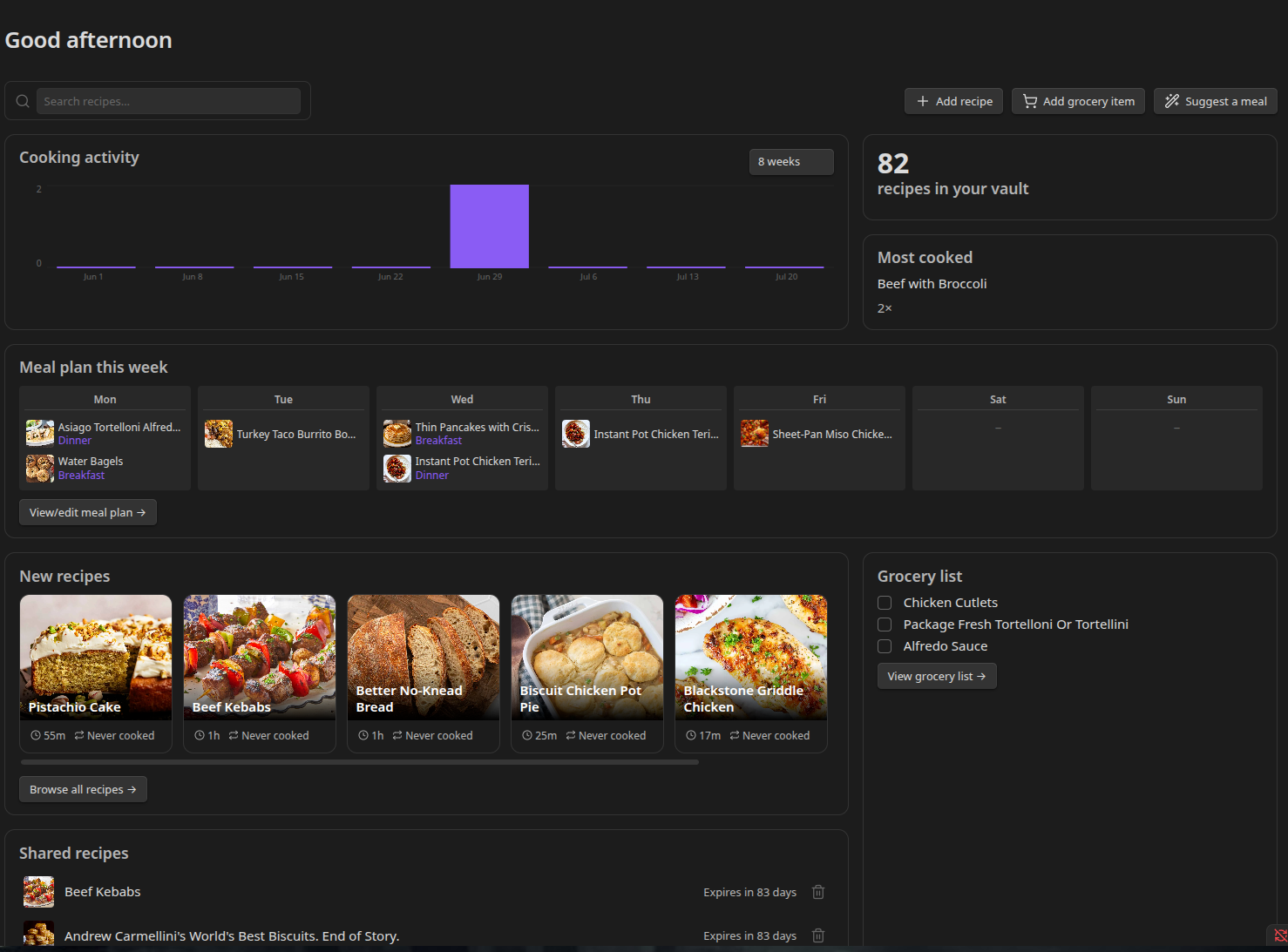
The Dashboard is Recipe Box's home base - a single glance-able view of your recipes, meal plan, grocery list, and any recipes you've shared, with quick actions to jump into anything from one place.
Opening the Dashboard
Click the Recipe Box dashboard icon in the ribbon, or run the Open recipe dashboard command.
By default this single icon replaces the separate grocery list / meal plan / gallery ribbon icons. If you'd rather keep those three instead, turn off Enable dashboard under Settings → Recipe Box → Recipe library - the individual icons reappear (and the dashboard command/icon disappear) when it's off. Either way, every view is still reachable from its own Command Palette command (Open grocery list, Open meal plan, Open recipe gallery).
Layout
- Greeting - a time-of-day message ("Good morning" / "Good afternoon" / "Good evening") at the top.
- Search and quick actions - a search box alongside Add recipe, Add grocery item, and Suggest a meal buttons.
- Cooking activity chart (or Recently made, if cook history is off) and stat cards (Total recipes, Most cooked) side by side.
- Meal plan this week - a 7-column mini-grid, Monday through Sunday.
- New recipes and Grocery preview side by side.
- Shared recipes - a list of anything you've published with Sharing a Recipe.
On mobile, everything stacks into a single column in the same top-to-bottom order.
Search and Quick Actions
Type into the search box and press Enter to jump to the Gallery View filtered to your search term - the dashboard doesn't filter recipes itself, it hands off to the gallery.
The three buttons open the same dialogs their command-palette equivalents do:
- Add recipe - opens the recipe import dialog. See Importing Recipes from the Web.
- Add grocery item - opens the add-item dialog.
- Suggest a meal - opens the meal suggestion dialog. See Meal Suggestions.
Cooking Activity Chart
A bar chart of how many times you've cooked across recent weeks (or days, at shorter ranges), read from your Cook History entries.
- Range - a dropdown next to the chart lets you pick 2, 4, 8, or 12 weeks back. Shorter ranges (2/4 weeks) show a bar per day; longer ranges (8/12 weeks) show a bar per week, so the chart stays readable at a glance. Your chosen range is remembered the next time you open the dashboard.
- Hover a bar to see the exact count for that day/week. Click a bar to see which recipes were cooked in that period.
- If Track cook history is turned off in settings, there's no cook-history data to chart - the Recently made list (your last 3 cooked recipes) appears in this spot instead.
Stat Cards
- Total recipes - how many recipes are currently in scope (matching your recipe folders and recipe type). Click to open the Gallery View.
- Most cooked - the recipe with the highest cook count, and how many times. Click to open that recipe. Shows a placeholder message if nothing's been marked cooked yet.
Meal Plan This Week
A 7-day mini-grid mirroring your meal plan. Each day shows a thumbnail of the first recipe scheduled that day (with a +N badge if more than one entry is planned), or a dash if nothing's planned. Click a day with entries to see a quick list of what's scheduled; click an empty day to open the meal suggester. A View full meal plan → link opens the full Meal Plan view.
New Recipes
Your 6 most recently added recipes, shown as the same cards used in the Gallery View - each with its own ⋯ actions menu (add to meal plan, share, add to grocery). A View full gallery → link opens the Gallery View.
If you have no recipes yet, this section becomes a single Add your first recipe button instead.
Grocery Preview
Your next 8 unchecked grocery items, in the same order the Shopping Assistant groups them. Check an item off here and it's checked off in the real list too. If there are more than 8 unchecked items, the last row reads "+N more". A View full grocery list → link opens the Shopping Assistant.
Shared Recipes
Every recipe you currently have a public share link for (active or expired), with a thumbnail, name, and either "Expires in N days" or "Expired." Click a row to reopen the share dialog for that recipe (renew or copy its link); click the revoke icon to take the link down immediately after confirming. Shows "No recipes shared yet" if you haven't shared anything. See Sharing a Recipe.