Recipe Timers
Recipe Box can detect cooking times written in your instructions and turn them into one-click timers, so you don't need a separate kitchen timer app.
How Detection Works
When Enable timers is on, Recipe Box scans each instruction step for duration phrases - things like "bake for 25 minutes", "simmer 10-15 minutes", "let rest 1 hour", "cook for 2 hours 30 minutes" - and renders a clickable timer button inline next to the phrase.
For ranges (e.g. "10-15 minutes"), Timer range default controls whether the timer uses the max or min end of the range.
Using a Timer
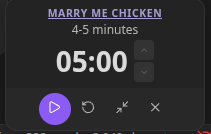
Click a detected duration to open a floating timer widget:
- Play / pause / reset controls
- Editable time - click the time to type a custom duration
- +/- steppers - adjust the time by Timer increment (minutes) at a time
- Compact mode - shrinks the widget to just the time display
- Close - dismisses the timer
If Auto-start timers is enabled, the countdown begins immediately when you click the duration.
If Default to compact timers is enabled, new timers open already in compact mode.
Move them anywhere on screen so they don't block the recipe. Multiple timers collect in a shared tray, so you can run several at once - one for the rice, one for the sauce.
Completion
When a timer reaches zero it plays an audio beep so you notice even if you've stepped away from the screen.
Related Settings
All timer behavior is configured under Settings → Recipe Box → Recipe timers: Enable timers, Auto-start timers, Default to compact timers, Timer range default, and Timer increment (minutes). See Settings Reference.