Sharing a Recipe
Recipe Box can publish any recipe to a public web page - no Obsidian, account, or Recipe Box installation required to view it. Share a link with anyone and they see a clean, read-only version of the recipe in their browser.
Sharing a Recipe
- Open the recipe in the Recipe View.
- Click the Share button in the action bar.
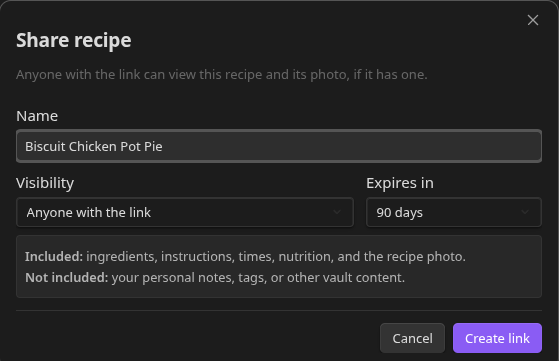
- Choose how long the link should stay active - 7, 30, or 90 days.
- Click Create link to publish. Recipe Box uploads the recipe and shows you the public URL, ready to copy.
The link looks like https://<share-domain>/<your-short-id>/<recipe-slug> - a short, stable ID for you plus a slug generated from the recipe title.
What Gets Shared
Recipe Box shares only an explicit allowlist of fields - title, description, servings, times, ingredients, instructions, nutrition, and the hero image. Anything not on that list stays private, including:
- Cook history entries and notes
- Any frontmatter property not on the allowlist
- Wikilinks and other Obsidian-specific formatting rendered out to plain text/links
The hero image is always included in the share. If it was originally pulled in by a web import, it carries a visible attribution back to its source - Recipe Box doesn't strip that credit. Images are resized and re-encoded on your device before upload to keep shares fast to load.
Viewing a Shared Recipe
The shared page is a standalone, mobile-friendly view styled to echo Recipe Box's own recipe cards, including automatic dark mode based on the visitor's system preference. No sign-in or plugin required - it works in any browser. Its accent color (badges, headings, links) matches your own Obsidian accent color at the time you shared, so the page carries a bit of your vault's look even though the recipient never sees Obsidian itself.
A Print button in the top corner opens the browser's print dialog with a simplified, black-and-white layout (no button, no hover styling) suited to a printed page.
Share Status on the Recipe
While a recipe is shared, the Recipe View shows a Shared · expires in N days pill in its sidebar - click it to reopen the share dialog. This is the main indicator; a smaller icon swap in the header toolbar reflects the same status.
Managing and Revoking a Share
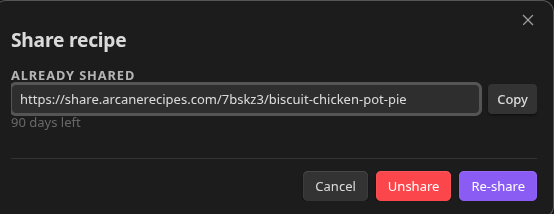
Each share you create can be revoked at any time from the same Share button/dialog on the recipe - revoking immediately takes the public page down. Links also expire automatically once the period you chose (7/30/90 days) has passed.
Only one active share link exists per recipe at a time; creating a new link (or changing the expiry) replaces the previous one.