Shopping Assistant
The Shopping Assistant is Recipe Box's grocery list view - it combines ingredients from your meal plan with any one-off items you add, deduplicates and sums quantities, and groups everything for easy shopping.
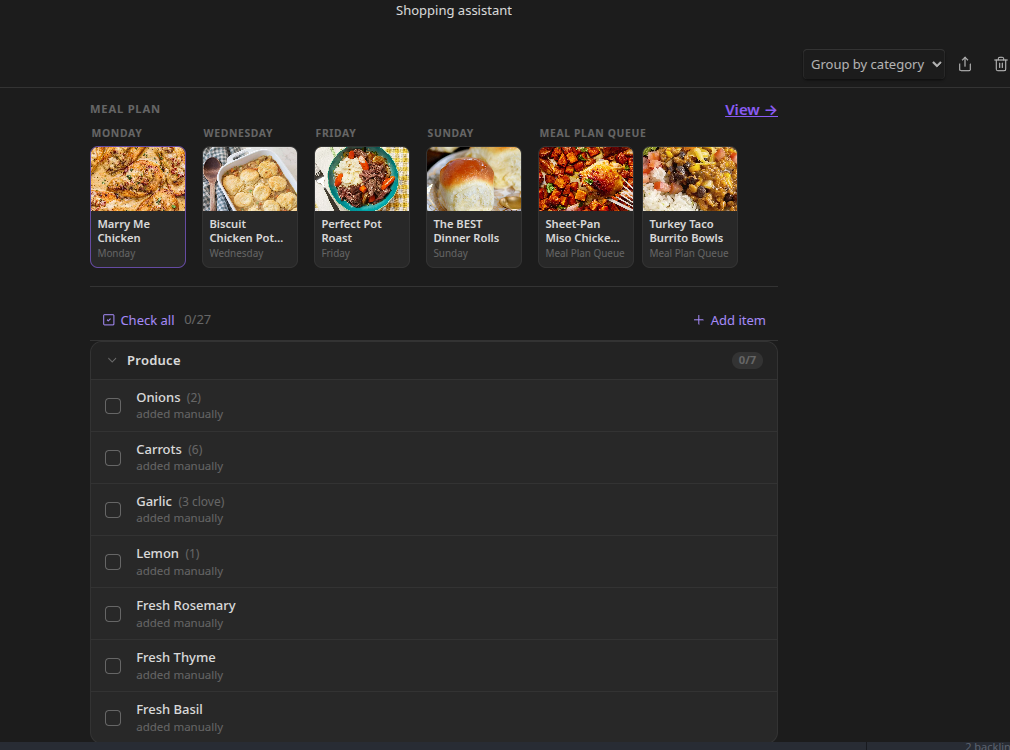
Opening It
Run the Shopping assistant command, or open it from the Dashboard's grocery preview ("View full grocery list →").
Toolbar
- Grouping dropdown - switch between Category, Recipe, Source, or flat (None) grouping directly from the dropdown. The current grouping is always visible without opening a menu.
- Export - opens the export dialog. See #Exporting.
- Clear grocery list - clears the grocery list only (not the meal plan). Destructive; asks for confirmation.
Above the List
- Check all / Uncheck all - toggle the checked state of every item at once.
- Add item - opens a dialog to add a one-off grocery item.
Grouping Modes
- Category (default) - items grouped by category (Produce, Dairy, Meat, etc.). Category order follows your Category order setting unless Auto-sort categories is enabled, in which case categories sort alphabetically. See Categorizing Grocery Items.
- Recipe - items grouped by which recipe(s) contributed them. An ingredient needed by two recipes appears under both, each showing only that recipe's quantity. Manually-added items appear under "Manually added items".
- Source - two groups: "From Meal Plan" and "Manually added items".
- None - a single flat, alphabetical list.
Combining and Quantities
Ingredients with the same normalized name and unit are merged into a single line, with quantities summed. If one source has a quantity and another doesn't, the known quantity is kept and both sources are recorded.
Checking Items Off
Click an item to toggle it checked. This updates the checkbox directly in your grocery list note, so the note and the view always match.
If Auto-collapse completed sections is enabled, a group collapses automatically once its last unchecked item is checked off.
Adding One-off Items
Click Add item to open the add/edit dialog:
- Quick entry - type a free-form line like "2 cans black beans" and Recipe Box parses the quantity, unit, and name for you.
- Or fill in Name, Quantity, Unit, and Category individually. Category is optional - leave it blank to auto-detect.
Editing One-off Items
Right-click (or long-press on mobile) a one-off item for a context menu with Edit, Move to category, and Remove.
The Grocery List Note Format
Recipe Box writes the grocery list as Markdown checkboxes grouped by category heading:
# Grocery List

## Produce
- [ ] 1 onion
- [x] 2 cloves garlic

## Dairy
- [ ] 1 cup milk
You can edit this note directly - check items off, add lines, or adjust quantities - and the Shopping Assistant reflects your edits.
Exporting
The export dialog offers:
- Format - Plain text, Markdown checklist, or Markdown grouped by category.
- Include checked items - toggle whether checked-off items are included.
- A live preview of the output.
- Append to note - paste the export directly into another note at a path you choose.
Related
- Meal Planning - how items get onto the grocery list in the first place
- Categorizing Grocery Items - customizing categories and grouping
- Setting Up Meal Plan and Grocery Notes - configuring note paths