Recipe Export
Recipe Box can export any recipe in several formats - for sharing, backup, or use in other apps. The export button is in the Recipe View header.
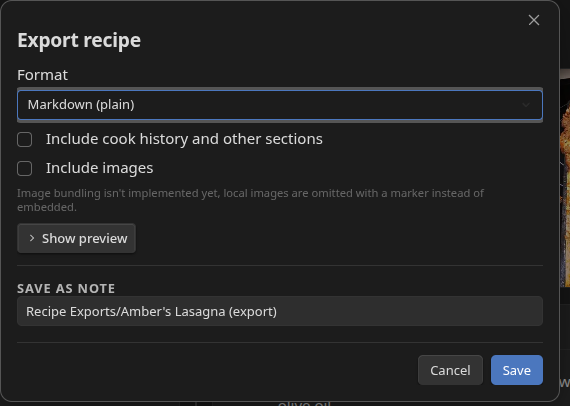
Formats
| Format | Output | Use case |
|---|---|---|
| Markdown (plain) | Clean, human-readable Markdown with no plugin-specific frontmatter | Sharing with someone who doesn't use Recipe Box |
| Markdown (importable) | Markdown with Recipe Box frontmatter intact | Moving a recipe between vaults that both use Recipe Box |
| JSON | Machine-readable structured recipe data | Integrating with other tools or scripts |
| JSON-LD | Schema.org compliant recipe data | SEO embedding, structured data validators, recipe apps that read JSON-LD |
Markdown formats save as a new note inside your vault. JSON and JSON-LD trigger a file download to your device instead - they're interchange artifacts, not vault content.
Options
Include cook history and other sections - includes your cook history entries and any other non-recipe sections from the note body. On by default.
Include images - embeds images in the export where the format supports it. Local vault images are currently omitted with a placeholder marker rather than bundled into the file.
Export at current multiplier - only shown when the recipe is scaled (multiplier ≠ 1). Exports ingredient quantities at the current scale instead of the base recipe amounts.
Output Location
For Markdown formats, the Save as note path field pre-fills with your configured Export folder (default Recipe Exports) and the recipe name. You can type any vault-relative path; an autocomplete suggests existing notes as you type.
For JSON/JSON-LD, the filename is the recipe's note name with a .json or .jsonld extension.
Preview
Click Show preview to expand a read-only text area showing what will be exported before you commit. The preview updates when you change the format or options. It's collapsed by default since building the full recipe body is relatively expensive.
Settings
Under Settings → Recipe Box → Export:
| Setting | Default | What it does |
|---|---|---|
| Export folder | Recipe Exports |
Default vault-relative folder for Markdown exports. Can be overridden per-export in the path field. |
| Default format | Markdown (plain) | Format pre-selected when the export dialog opens. |
| Include cook history by default | On | Pre-checks the "Include cook history" option. |
| Include images by default | On | Pre-checks the "Include images" option. |
Related
- Recipe View - where the export button lives
- Settings Reference